Audit log filter functions, options, and variables
Reference for audit log filter functions and options / variables.
Audit log filter functions
Available UDFs:
audit_log_encryption_password_get(keyring_id)
Returns the audit encryption password (and iteration metadata) from the enabled keyring. Without a working keyring, the call errors.
Parameters
keyring_id — Omit to fetch the active password. Pass a keyring ID to read a specific archived or current entry.
Returns
JSON with password and iterations for the requested keyring entry.
Example
SELECT audit_log_encryption_password_get();
Expected output
+---------------------------------------------+
| audit_log_encryption_password_get()         |
+---------------------------------------------+
| {"password":"passw0rd","iterations":5689}   |
+---------------------------------------------+
audit_log_encryption_password_set(new_password)
Sets a new audit encryption password in the keyring. The call may also rotate the log file when encryption is active. See Audit Log Filter compression and encryption.
Parameters
new_password — String up to 766 bytes.
Returns
OK on success; an error string on failure.
Example
SELECT audit_log_encryption_password_set('passw0rd');
Expected output
+-----------------------------------------------------+
| audit_log_encryption_password_set('passw0rd')       |
+-----------------------------------------------------+
| OK                                                  |
+-----------------------------------------------------+
audit_log_filter_flush()
Reloads filter JSON and account rows from mysql.audit_log_filter / mysql.audit_log_user into the component so memory matches disk.
Table edits alone do not refresh every open session. Table edits include direct DML and audit_log_filter_set_filter(). Call audit_log_filter_flush() when all sessions must see new rules. For details, see Persistence and refreshing on audit_log_filter_set_filter().
A flush detaches existing sessions until those sessions reconnect or run CHANGE_USER. New connections apply the reloaded registry immediately. When you cannot tolerate a gap, reconnect clients after flushing.
Parameters
None.
Returns
This function returns either an OK for success or an error message for failure.
Example
SELECT audit_log_filter_flush();
Expected output
+--------------------------+
| audit_log_filter_flush() |
+--------------------------+
| OK                       |
+--------------------------+
audit_log_read()
Reads JSON or JSONL audit files and returns events as a JSON array string. Other formats error.
Parameters
The function accepts a single JSON argument that selects a starting point. Four forms are valid:
-
Empty or omitted argument. The function continues from the current read cursor in this session. Calling
audit_log_read()with no argument is equivalent to passing'{}'. Both forms require a read context that an earlier call already established. Without a context, the call returns theWrong argument formaterror. -
startenvelope. The function begins a new read sequence at the position described by an inner bookmark. The bookmark acceptstimestampandid. Atimestamp-only start is legal. When the timestamp has no time part, the component assumes00:00:00. -
Bookmark literal. Pass the JSON returned by
audit_log_read_bookmark()directly, with nostartenvelope. The bookmark form requires bothtimestampandid. Passing one without the other returns theWrong argument formaterror. Passing a non-stringtimestampor a non-integeridreturns thebad bookmark formaterror. -
JSON
null. The argument'null'closes the active read sequence in this session. Use this form to release the reader cursor before opening a new sequence with a differentstartor bookmark. The function returns the stringOK.
Position arguments are mutually exclusive. A single call cannot combine start with a top-level timestamp or id. A call cannot supply a new start or bookmark while a read context is already active in the session. To reposition, close the sequence with 'null' and then issue a new start or bookmark literal.
The optional max_array_length key caps how many events the call returns. Use it to page through dense periods or to limit response size. The key is valid in any form that supplies a position.
The following table summarizes the top-level keys:
| Key | Type | Purpose |
|---|---|---|
start |
object with timestamp |
Start a new read sequence from the given UTC timestamp. |
timestamp |
string | Bookmark form. Must be paired with id. |
id |
unsigned integer | Bookmark form. Must be paired with timestamp. |
max_array_length |
unsigned integer | Cap on the number of events returned per call. Combines with either start form. |
Seed reads with audit_log_read_bookmark() when you want to resume from the tail of the log.
Returns
JSON array text, JSON NULL when no more events are available, the literal string OK when the call closes the active read sequence with the 'null' argument, or an error. Output is strictly valid JSON, honors max_array_length, and resumes cleanly from bookmarks.
Examples
Resume from the most recent event (typical pattern):
SELECT audit_log_read(audit_log_read_bookmark());
Expected output
+------------------------------------------------------------------------------+
| audit_log_read(audit_log_read_bookmark())                                    |
+------------------------------------------------------------------------------+
| [{"timestamp" : "2023-06-02 09:43:25", "id": 10, "class":"connection"}]      |
+------------------------------------------------------------------------------+
Start from a specific date and time:
SELECT audit_log_read('{"start": {"timestamp": "2026-05-20 12:28:10"}}');
Start from a date with no time portion (the component assumes 00:00:00):
SELECT audit_log_read('{"start": {"timestamp": "2026-05-20"}}');
Cap the response size with max_array_length:
SELECT audit_log_read('{"start": {"timestamp": "2026-05-20 12:28:10"}, "max_array_length": 3}');
Resume from an explicit bookmark (both timestamp and id required, top-level, no start wrapper):
SELECT audit_log_read('{"timestamp": "2026-05-20 12:28:10", "id": 1561422}');
Continue the current read sequence (no argument, requires an active reader context):
SELECT audit_log_read();
Close the current read sequence:
SELECT audit_log_read('null');
audit_log_read_bookmark()
Returns a JSON bookmark for the latest event. Supported for JSON and JSONL formats only. Other formats return an error.
Pass the bookmark into audit_log_read() to begin there.
SELECT audit_log_read(audit_log_read_bookmark());
Parameters
None.
Returns
This function returns a JSON string containing a bookmark for success or NULL and an error for failure.
Example
SELECT audit_log_read_bookmark();
Expected output
+----------------------------------------------------+
| audit_log_read_bookmark()                          |
+----------------------------------------------------+
| {"timestamp" : "2023-06-02 09:43:25", "id": 10 }   |
+----------------------------------------------------+
audit_log_session_filter_id()
Returns the active filter ID for this session, or 0 when no filter applies.
audit_log_filter_remove_filter(filter_name)
Drops a filter definition and clears mysql.audit_log_user rows that pointed at it.
Only sessions using that filter detach; others keep logging.
Parameters
filter_name - a selected filter name as a string.
Returns
This function returns either an OK for success or an error message for failure.
If the filter name does not exist, no error is generated.
Example
SELECT audit_log_filter_remove_filter('filter-name');
Expected output
+------------------------------------------------+
| audit_log_filter_remove_filter('filter-name')  |
+------------------------------------------------+
| OK                                             |
+------------------------------------------------+
audit_log_filter_remove_user(user_name)
Removes the mysql.audit_log_user row for that account pattern.
Open sessions keep the cached filter until reconnect or CHANGE_USER. New sessions fall back to the % default, or stop auditing when no default exists.
Passing user_name = '%' clears the default assignment.
Parameters
user_name - a selected user name in either the user_name@host_name format or %.
Returns
This function returns either an OK for success or an error message for failure.
If the user_name has no filter assigned, no error is generated.
Example
SELECT audit_log_filter_remove_user('user-name@localhost');
Expected output
+------------------------------------------------------+
| audit_log_filter_remove_user('user-name@localhost')  |
+------------------------------------------------------+
| OK                                                   |
+------------------------------------------------------+
audit_log_rotate()
Rotates the active audit file and returns the archived name.
Colliding timestamps add a -N suffix so rotations never overwrite each other.
Parameters
None.
Returns
This function returns the renamed file name.
Example
SELECT audit_log_rotate();
audit_log_filter_set_filter(filter_name, definition)
Writes JSON for filter_name to mysql.audit_log_filter (create or update). Each stored revision gets a new filter ID.
Validation runs at parse time. Bad fields, unknown classes or subclasses, empty arrays, stray JSON keys, and broken print rules abort the call with a detailed error. For example:
ERROR: Incorrect rule definition: Unknown field name "WRONG.str" for class "general"
In REDUCED event mode, a filter definition that references disabled event classes or subclasses fails the same way (error returned, filter not stored).
Persistence and refreshing
audit_log_filter_set_filter() persists JSON but does not patch in-memory state for every open session. Run audit_log_filter_flush() to reload all definitions into the component.
After a flush, existing sessions detach until reconnect or CHANGE_USER. New sessions apply changes immediately.
Parameters
-
filter_name- a selected filter name as a string. -
definition- Defines the definition as a JSON value.
Returns
This function returns either an OK for success or an error message for failure.
Example
SET @filter = '{ "filter": { "log": true } }';
SELECT audit_log_filter_set_filter('filter-name', @filter);
Expected output
+-------------------------------------------------------------+
| audit_log_filter_set_filter('filter-name', @filter)  |
+-------------------------------------------------------------+
| OK                                                          |
+-------------------------------------------------------------+
audit_log_filter_set_user(user_name, filter_name)
Binds filter_name to a login pattern in mysql.audit_log_user.
Host wildcards (%, _) work in the host portion ('usr1@%', 'usr2%172.16.10.%', 'usr3@%.mycorp.com', …).
This UDF controls which named filter loads for a session. JSON user and host keys inside the filter still narrow events after load, but those keys are not a second assignment row. See Assignment vs rules inside the JSON.
Avoid overlapping patterns unless you accept ambiguous matches. Prefer literals, or one pattern plus %.
One active mapping exists per account row. The call replaces any previous mapping.
Open sessions keep the old mapping until reconnect or CHANGE_USER. Flush when you must realign all sessions immediately.
The special user % is the default row used when no literal match exists. Specific user@host rows always beat %.
Parameters
-
user_name- a selected user name in either theuser_name@host_nameformat or%. -
filter_name- a selected filter name as a string.
Returns
This function returns either an OK for success or an error message for failure.
Example
SELECT audit_log_filter_set_user('user-name@localhost', 'filter-name');
Expected output
+-------------------------------------------------------------------+
| audit_log_filter_set_user('user-name@localhost', 'filter-name')  |
+-------------------------------------------------------------------+
| OK                                                                |
+-------------------------------------------------------------------+
Audit log filter options and variables
Audit Log Filter component uses the SQL form audit_log_filter.<option> (for example audit_log_filter.file).
Examples: command line and option file
Use the same option spelling as the Command-line field in each variable’s reference table. The long name uses hyphens in the audit-log-filter prefix and keeps a dot before the option, for example --audit-log-filter.file. Read-only options require a server restart. Use SET GLOBAL only where the variable is documented as dynamic.
Startup and runtime variables
The following settings are system variables (audit_log_filter.<option>). Each subsection lists the command-line name and whether the variable is dynamic.
audit_log_filter.buffer_size
| Option name | Description |
|---|---|
| Command-line | –audit-log-filter.buffer-size |
| Dynamic | No |
| Scope | Global |
| Data type | Integer |
| Default | 1048576 |
| Minimum value | 4096 |
| Maximum value | 18446744073709547520 |
| Units | bytes |
| Block size | 4096 |
Read-only size of the asynchronous audit buffer (multiples of 4096 bytes). Events queue here before hitting disk. Requires restart to change.
The component allocates one buffer for its lifetime.
Example
my.cnf (restart required):
[mysqld]
audit-log-filter.buffer-size=2097152
audit_log_filter.compression
| Option name | Description |
|---|---|
| Command-line | –audit-log-filter.compression |
| Dynamic | No |
| Scope | Global |
| Data type | Enumeration |
| Default | NONE |
| Valid values | NONE or GZIP |
Read-only compression mode: NONE (default) or GZIP. Requires restart.
Example
my.cnf (restart required):
[mysqld]
audit-log-filter.compression=GZIP
audit_log_filter.database
| Option name | Description |
|---|---|
| Command-line | –audit-log-filter.database |
| Dynamic | No |
| Scope | Global |
| Data type | String |
| Default | mysql |
Read-only database that hosts audit_log_filter and audit_log_user. The value must be non-NULL, 64 characters or fewer, and valid. An invalid value prevents the component from starting. Restart to change the value.
Example
my.cnf (restart required):
[mysqld]
audit-log-filter.database=mysql
audit_log_filter.direct_io
| Option name | Description |
|---|---|
| Command-line | –audit-log-filter.direct-io |
| Dynamic | No |
| Scope | Global |
| Data type | Boolean |
| Default | OFF |
This variable is tech preview and may be removed in a future release.
This read-only variable opens the audit log file with O_DIRECT on Linux, bypassing the OS page cache. This variable requires a server restart to change.
When enabled, audit log writes bypass the Linux page cache, reducing memory pressure on busy servers with high audit log throughput.
Writes use a 4 KB aligned staging buffer internally.
If the file system does not support O_DIRECT or a direct write fails at runtime, the component gracefully falls back to buffered I/O with a warning.
Whether O_DIRECT works depends on the file system that backs the audit log path. Local ext4 and XFS volumes usually support direct I/O. tmpfs usually does not. Confirm support for the audit log directory before enabling audit_log_filter.direct_io.
Example
my.cnf (restart required):
[mysqld]
audit-log-filter.direct-io=ON
audit_log_filter.disable
| Option name | Description |
|---|---|
| Command-line | –audit-log-filter.disable |
| Dynamic | Yes |
| Scope | Global |
| Data type | Boolean |
| Default | OFF |
When ON, stops audit output for all sessions.
Runtime changes need SYSTEM_VARIABLES_ADMIN and AUDIT_ADMIN.
Example
Runtime:
SET GLOBAL audit_log_filter.disable = ON;
Persist across restarts (my.cnf):
[mysqld]
audit-log-filter.disable=ON
audit_log_filter.encryption
| Option name | Description |
|---|---|
| Command-line | –audit-log-filter.encryption |
| Dynamic | No |
| Scope | Global |
| Data type | Enumeration |
| Default | NONE |
| Valid values | NONE or AES |
This read-only variable defines the encryption type for the audit log filter file. This variable requires a server restart to change. The values can be either of the following:
-
NONE- the default value, no encryption -
AES
Example
my.cnf (restart required):
[mysqld]
audit-log-filter.encryption=AES
audit_log_filter.event_mode
| Option name | Description |
|---|---|
| Command-line | –audit-log-filter.event-mode |
| Dynamic | Yes |
| Scope | Global |
| Data type | Enumeration |
| Default | REDUCED |
| Available values | REDUCED, FULL |
This variable controls which event classes and subclasses are processed by the audit log filter component.
REDUCED (default) — limits processing to the four classes general, connection, table_access, and message, with only the subclasses listed in this section enabled. The extended classes are not processed in this mode.
-
general/status -
connection/connect,connection/disconnect,connection/change_user -
table_access/* -
message/*
The following event classes exist in the server but are disabled in REDUCED mode (they are available only in FULL mode):
-
global_variable -
command -
query -
stored_program -
authentication -
parse
The audit log filter disables the following subclasses in REDUCED mode:
-
general/log -
general/error -
general/result -
connection/pre_authenticate
In REDUCED mode, calling a stored procedure logs the outer CALL statement but not the individual SQL statements executed inside the procedure body. The general/status event generated by the internal Quit command is also suppressed in REDUCED mode.
FULL — all event classes and subclasses are processed, including global_variable, command, query, stored_program, authentication, and parse on top of the REDUCED set. The default is REDUCED.
Changing event_mode at runtime triggers an automatic filter reload.
Switching event_mode at runtime
The component reads event_mode on every audit event, not at session bind time. The switch is not atomic across an event stream:
-
A single statement that produces multiple events, including stored procedures, prepared statements, and connection flows, may have part of its events logged under the old mode and part under the new mode.
-
Sessions in flight at the moment of the switch may emit a mix of
REDUCEDandFULLrecords for the same logical operation. -
REDUCED→FULLadds previously suppressed classes such asquery,parse, andglobal_variableto events that arrive after the switch. Events that started before the switch and complete after it can be split: thestartmay be missing while a laterstatusorstatus_endfrom the same statement is recorded. -
FULL→REDUCEDdrops the extended classes from any event the component handles after the switch. The opposite asymmetry applies: a statement that emittedparseandquery/startrecords underFULLmay have noquery/status_endafter the switch.
When you need a clean cutover, take one of the following steps:
-
Pause the workload (drain or block new connections), then change
event_mode, then resume. -
Restart the server with the new value in the option file. Persistent filters reload with the new mode in effect, and no event spans the switch.
Persisted filters that reference classes disabled under the new mode are not removed. The component silently skips those classes and logs a warning. See the rules under audit_log_filter_set_filter().
Example
Runtime:
SET GLOBAL audit_log_filter.event_mode = 'FULL';
SELECT @@GLOBAL.audit_log_filter.event_mode;
Persist across restarts (my.cnf):
[mysqld]
audit-log-filter.event-mode=FULL
In REDUCED mode, a call to audit_log_filter_set_filter() with a filter definition that references disabled event classes or subclasses fails. The server returns a descriptive error and does not store the filter. Persisted filters created under FULL mode that reference disabled classes still load after a restart or audit_log_filter_flush(). The disabled classes are silently skipped with a warning.
audit_log_filter.file
| Option name | Description |
|---|---|
| Command-line | –audit-log-filter.file |
| Dynamic | No |
| Scope | Global |
| Data type | String |
| Default | audit_filter.log |
This read-only variable defines the filename of the audit log filter file. The component writes events to this file. This variable requires a server restart to change.
The filename can be either of the following:
-
a relative path name - the component looks for this file in the data directory
-
a full path name - the component uses the given value
If you use a full path name, ensure the directory exists and is accessible only to users who need to view the log and the server. If the parent directory does not exist, the component reports an error and the server starts without the audit log filter component active.
For more information, see Naming conventions
Example
Relative to the data directory (my.cnf, restart required):
[mysqld]
audit-log-filter.file=audit_filter.log
Absolute path:
[mysqld]
audit-log-filter.file=/var/log/mysql/audit_filter.log
audit_log_filter.format
| Option name | Description |
|---|---|
| Command-line | –audit-log-filter.format |
| Dynamic | No |
| Scope | Global |
| Data type | Enumeration |
| Default | JSONL |
| Available values | JSONL, JSON, NEW |
This read-only variable defines the audit log filter file format. This variable requires a server restart to change.
The available values are the following:
-
JSONL (default)
Example
my.cnf (restart required):
[mysqld]
audit-log-filter.format=JSONL
audit_log_filter.format_unix_timestamp
| Option name | Description |
|---|---|
| Command-line | –audit-log-filter.format-unix-timestamp |
| Dynamic | Yes |
| Scope | Global |
| Data type | Boolean |
| Default | OFF |
This option is supported for JSON-format and JSONL-format files.
Enabling this option adds a time field to JSON-format and JSONL-format files. The integer represents the UNIX timestamp value and indicates the date and time when the audit event was generated. Changing the value causes a file rotation because all records must either have or do not have the time field. This option requires the AUDIT_ADMIN and SYSTEM_VARIABLES_ADMIN privileges.
This option does nothing when used with other format types.
Example
Runtime (JSON-format or JSONL-format only; causes rotation when toggled):
SET GLOBAL audit_log_filter.format_unix_timestamp = ON;
Persist across restarts (my.cnf):
[mysqld]
audit-log-filter.format-unix-timestamp=ON
audit_log_filter.handler
| Option name | Description |
|---|---|
| Command-line | –audit-log-filter.handler |
| Dynamic | No |
| Scope | Global |
| Data type | String |
| Default | FILE |
This read-only variable defines where the component writes the audit log filter file. This variable requires a server restart to change. The following values are available:
-
FILE- component writes the log to a location specified inaudit_log_filter.file -
SYSLOG- component writes to the syslog
Example
Write to a file under the data directory (my.cnf, restart required):
[mysqld]
audit-log-filter.handler=FILE
audit-log-filter.file=audit_filter.log
Write to syslog (use with audit_log_filter.syslog_tag and related options):
[mysqld]
audit-log-filter.handler=SYSLOG
audit-log-filter.syslog-tag=myapp-audit
audit_log_filter.key_derivation_iterations_count_mean
| Option name | Description |
|---|---|
| Command-line | –audit-log-filter.key-derivation-iterations-count-mean |
| Dynamic | Yes |
| Scope | Global |
| Data type | Integer |
| Default | 600000 |
| Minimum value | 1000 |
| Maximum value | 1000000 |
Defines the mean value of iterations used by the password-based derivation routine while calculating the encryption key and iv values. A random number represents the actual iteration count and deviates no more than 10% from this value.
Example
Runtime:
SET GLOBAL audit_log_filter.key_derivation_iterations_count_mean = 120000;
audit_log_filter.max_size
| Option name | Description |
|---|---|
| Command-line | –audit-log-filter.max-size |
| Dynamic | Yes |
| Scope | Global |
| Data type | Integer |
| Default | 1073741824 |
| Minimum value | 0 |
| Maximum value | 18446744073709551615 |
| Unit | bytes |
| Block size | 4096 |
This variable defines the maximum combined size of all audit log files before pruning occurs.
The default value is 1073741824 (1 GiB).
Behavior: * A limit of 0 disables size-based pruning.
-
With a positive limit, pruning runs when the combined size of all audit log files exceeds that limit.
-
The server rounds each non-zero limit down to the nearest multiple of 4096 bytes (block size).
-
Any limit less than 4096 is treated as 0 (disabled).
Recommendation: When both audit_log_filter.rotate_on_size and audit_log_filter.max_size are greater than 0, set audit_log_filter.max_size to at least seven times the audit_log_filter.rotate_on_size value.
Mutual exclusion with prune_seconds: Setting audit_log_filter.max_size to a non-zero value automatically resets audit_log_filter.prune_seconds to 0. When both variables are non-zero at startup, audit_log_filter.max_size takes precedence, audit_log_filter.prune_seconds is ignored, and the server logs a warning.
Pruning requirements: To enable pruning, you must configure at least one of the following:
* audit_log_filter.rotate_on_size - enables rotation
* audit_log_filter.max_size - enables size-based pruning
* audit_log_filter.prune_seconds - enables time-based pruning
Example
Combined size cap for pruning (example: 10 GiB), with rotation and age pruning configured elsewhere:
SET GLOBAL audit_log_filter.max_size = 10737418240;
audit_log_filter.password_history_keep_days
| Option name | Description |
|---|---|
| Command-line | –audit-log-filter.password-history-keep-days |
| Dynamic | Yes |
| Scope | Global |
| Data type | Integer |
| Default | 0 |
Defines when passwords may be removed and measured in days. Setting this variable requires the AUDIT_ADMIN privilege.
Encrypted log files have passwords stored in the keyring. The component also stores a password history. A password does not expire, despite being past the value, in case the password is used for rotated audit logs. The operation of creating a password also archives the previous password.
The default value is 0 (zero). This value disables the expiration of passwords. Passwords are retained forever.
If the component starts and encryption is enabled, the component checks for an audit log filter encryption password. If a password is not found, the component generates a random password and stores it in the keyring. To read the active password (or iteration metadata), call audit_log_encryption_password_get().
Call audit_log_encryption_password_set(new_password) to set a specific password.
Example
Retain archived encryption passwords for 30 days:
SET GLOBAL audit_log_filter.password_history_keep_days = 30;
audit_log_filter.prune_seconds
| Option name | Description |
|---|---|
| Command-line | –audit-log-filter.prune-seconds |
| Dynamic | Yes |
| Scope | Global |
| Data type | Integer |
| Default | 0 |
| Minimum value | 0 |
| Maximum value | 1844674073709551615 |
| Unit | seconds |
Defines when the audit log filter file is pruned. This pruning is based on the age of the file. The value is measured in seconds.
A value of 0 (zero) is the default and disables pruning. The maximum value is 18446744073709551615.
A value greater than 0 enables pruning. An audit log filter file can be pruned after this value.
Mutual exclusion with max_size: Setting audit_log_filter.prune_seconds to a non-zero value automatically resets audit_log_filter.max_size to 0. When both variables are non-zero at startup, audit_log_filter.max_size takes precedence, audit_log_filter.prune_seconds is ignored, and the server logs a warning.
To enable log pruning, you must set one of the following:
- Enable log rotation by setting
audit_log_filter.rotate_on_size - Add a value greater than 0 (zero) for either
audit_log_filter.max_sizeoraudit_log_filter.prune_seconds
Example
Prune files older than seven days (604800 seconds), with rotation enabled:
SET GLOBAL audit_log_filter.prune_seconds = 604800;
audit_log_filter.read_buffer_size
| Option name | Description |
|---|---|
| Command-line | –audit-log-filter.read-buffer-size |
| Dynamic | Yes |
| Scope | Global |
| Data type | Integer |
| Unit | Bytes |
| Default | 32768 |
| Minimum value | 32768 |
| Maximum value | 4294967295 |
This option is supported for JSON-format and JSONL-format files.
The size of the buffer for reading from the audit log filter file. audit_log_read() reads only from this buffer size.
Example
Runtime:
SET GLOBAL audit_log_filter.read_buffer_size = 65536;
audit_log_filter.rotate_on_size
| Option name | Description |
|---|---|
| Command-line | –audit-log-filter.rotate-on-size |
| Dynamic | Yes |
| Scope | Global |
| Data type | Integer |
| Default | 1073741824 |
Performs an automatic log file rotation based on the size. The default value is 1073741824. If the value is greater than 0, when the log file size exceeds the value, the component renames the current file and opens a new log file using the original name.
If you set the value to less than 4096, the component does not automatically rotate the log files. You can rotate the log files manually using audit_log_rotate(). If the value is not a multiple of 4096, the component truncates the value to the nearest multiple.
Example
Rotate when the file reaches 512 MiB:
SET GLOBAL audit_log_filter.rotate_on_size = 536870912;
audit_log_filter.strategy
| Option name | Description |
|---|---|
| Command-line | –audit-log-filter.strategy |
| Dynamic | No |
| Scope | Global |
| Data type | Enumeration |
| Default | ASYNCHRONOUS |
This read-only variable defines the Audit Log filter component’s logging method. This variable requires a server restart to change. The valid values are the following:
| Values | Description |
|---|---|
| ASYNCHRONOUS | Waits until outer buffer space becomes available |
| PERFORMANCE | If the outer buffer does not have enough space, drops the entire event atomically (the event is either fully written or fully dropped, keeping the log output well-formed) |
| SEMISYNCHRONOUS | Operating system permits caching |
| SYNCHRONOUS | Each request calls fsync() to flush the audit event to durable storage before the audited statement returns to the client. Expect higher write latency compared to SEMISYNCHRONOUS. |
The following diagram summarizes buffering, dropping behavior, and durability characteristics for each strategy value.
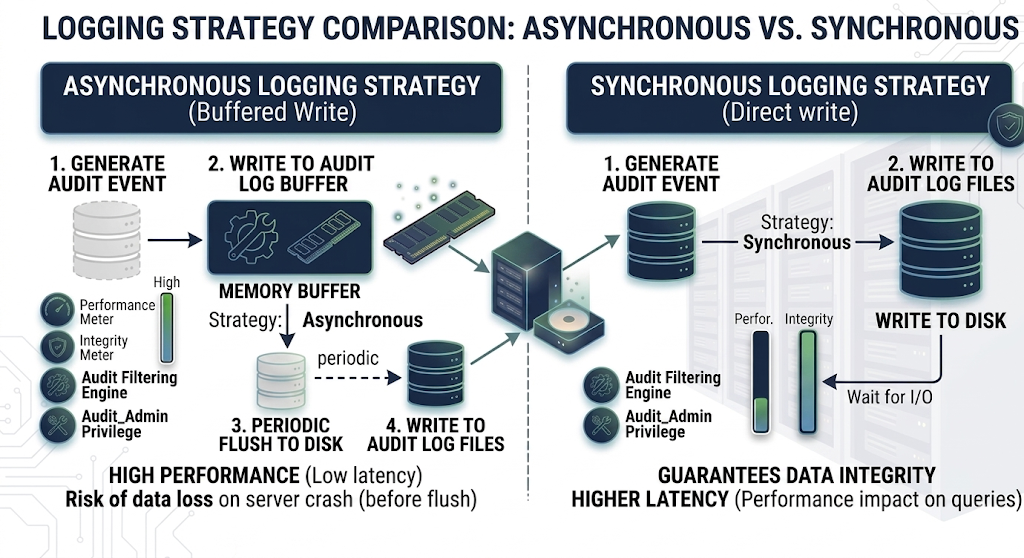
Performance trade-offs
Switch from the default ASYNCHRONOUS to SYNCHRONOUS only when durability is more important than throughput and latency. Examples include strict compliance or forensic environments, where every audit event must be on durable storage before the client sees the audited statement complete.
The main risk of ASYNCHRONOUS is a crash or power-loss window: the newest audit events can still be in memory and may be lost if they have not yet been flushed or synced to disk. That is not the same as dropping under load: ASYNCHRONOUS waits for buffer space and does not discard events when the buffer is full. The mode that can drop whole events when the outer buffer lacks space is PERFORMANCE.
Example
my.cnf (restart required):
[mysqld]
audit-log-filter.strategy=SYNCHRONOUS
audit_log_filter.syslog_tag
| Option | Description |
|---|---|
| Command-line | –audit-log-filter.syslog-tag= |
| Dynamic | No |
| Scope | Global |
| Data type | String |
| Default | audit-filter |
This read-only variable specifies the syslog tag value. This variable requires a server restart to change.
Example
my.cnf (restart required; use with audit-log-filter.handler=SYSLOG):
[mysqld]
audit-log-filter.syslog-tag=myapp-audit
audit_log_filter.syslog_facility
| Option name | Description |
|---|---|
| Command-line | –audit-log-filter.syslog-facility |
| Dynamic | No |
| Scope | Global |
| Data type | String |
| Default | LOG_USER |
This read-only variable specifies the syslog facility value. This variable requires a server restart to change. The option has the same meaning as the appropriate parameter described in the syslog(3) manual .
Example
my.cnf (restart required):
[mysqld]
audit-log-filter.syslog-facility=LOG_USER
audit_log_filter.syslog_priority
| Option name | Description |
|---|---|
| Command-line | –audit-log-filter.syslog-priority |
| Dynamic | No |
| Scope | Global |
| Data type | String |
| Default | LOG_INFO |
This read-only variable defines the priority value for the syslog. This variable requires a server restart to change. The option has the same meaning as the appropriate parameter described in the syslog(3) manual .
Example
my.cnf (restart required):
[mysqld]
audit-log-filter.syslog-priority=LOG_INFO
Audit log filter status variables
Counters and gauges for audit filter activity. These are not configuration: you cannot SET them; they only change as the server processes audit events. For how they differ from system variables (naming, SHOW commands, and purpose), see the table at the start of Audit log filter options and variables. For SHOW GLOBAL STATUS examples, see Examples: command line and option file. These names use underscores only (audit_log_filter_<name>). Names and counters are registered as SHOW_VAR status_vars[] in sys_vars.cc; behavior is documented on the SysVars helpers in sys_vars.h. Buffering and drop behavior for file logging is implemented in file_writer_buffering.cc.
| Name | Description | Example |
|---|---|---|
audit_log_filter_current_size |
Current size in bytes of the active audit log file. Resets when the log is rotated. | SHOW GLOBAL STATUS LIKE 'audit_log_filter_current_size'; |
audit_log_filter_direct_writes |
Number of times data was written synchronously while bypassing the write buffer, for example when a record is larger than the buffer under the ASYNCHRONOUS strategy. | SHOW GLOBAL STATUS LIKE 'audit_log_filter_direct_writes'; |
audit_log_filter_event_max_drop_size |
Size in bytes of the largest event dropped when the PERFORMANCE strategy cannot buffer it (buffer full or oversized record with drop-on-full). | SHOW GLOBAL STATUS LIKE 'audit_log_filter_event_max_drop_size'; |
audit_log_filter_events |
Number of audit events handled by the audit log filter component. | SHOW GLOBAL STATUS LIKE 'audit_log_filter_events'; |
audit_log_filter_events_filtered |
Number of audit events that were filtered out (no log line written). | SHOW GLOBAL STATUS LIKE 'audit_log_filter_events_filtered'; |
audit_log_filter_events_lost |
Number of audit events not written, including PERFORMANCE-mode drops and failures from the log writer. | SHOW GLOBAL STATUS LIKE 'audit_log_filter_events_lost'; |
audit_log_filter_events_written |
Number of audit events written to the audit log. | SHOW GLOBAL STATUS LIKE 'audit_log_filter_events_written'; |
audit_log_filter_total_size |
Total size in bytes of data written to audit log files; increases even when a log file is rotated. | SHOW GLOBAL STATUS LIKE 'audit_log_filter_total_size'; |
audit_log_filter_write_waits |
Number of times an event waited for space in the audit buffer under the ASYNCHRONOUS strategy. | SHOW GLOBAL STATUS LIKE 'audit_log_filter_write_waits'; |
To read the current value in SQL as a single row:
SELECT variable_value
FROM performance_schema.global_status
WHERE variable_name = 'audit_log_filter_events_written';