Filter the Audit Log Filter logs
Rule-based filtering includes or excludes events by these attributes:
-
User account
-
Audit event class
-
Audit event subclass
-
Audit event fields, for example
COMMAND_CLASSorSTATUS
audit_log_filter.event_mode controls which classes and subclasses you can target. Validated names appear in Audit Log Filter definition fields.
Define multiple filters and assign any filter to multiple accounts. You can also register a default filter for accounts without a specific row. Define filters through SQL function calls.
After you define a filter, the server persists the filter in mysql system tables.
Audit log filter functions
The six management UDFs in the following table — audit_log_filter_flush(), audit_log_filter_set_filter(), audit_log_filter_remove_filter(), audit_log_filter_set_user(), audit_log_filter_remove_user(), and audit_log_rotate() — require the AUDIT_ADMIN privilege.
The reader UDFs (audit_log_read(), audit_log_read_bookmark()), the session-id helper (audit_log_session_filter_id()), and the keyring helpers (audit_log_encryption_password_get(), audit_log_encryption_password_set()) do not require AUDIT_ADMIN. The keyring helpers require an initialized keyring component or plugin.
The following functions drive rule-based filtering:
| Function | Description | Example |
|---|---|---|
audit_log_filter_flush() |
Flush filter tables and reload definitions into the component. | SELECT audit_log_filter_flush(); |
audit_log_filter_set_filter() |
Create or replace a named filter. | SELECT audit_log_filter_set_filter('log_connections', '{ "filter": {} }'); |
audit_log_filter_remove_filter() |
Drop a named filter. | SELECT audit_log_filter_remove_filter('filter-name'); |
audit_log_filter_set_user() |
Bind a filter to a user account. | SELECT audit_log_filter_set_user('user-name@localhost', 'filter-name'); |
audit_log_filter_remove_user() |
Clear filter bindings for a user account. | SELECT audit_log_filter_remove_user('user-name@localhost'); |
Use SQL to define, inspect, and change audit log filters. Definitions live in the mysql system database.
audit_log_session_filter_id() returns the active audit log filter ID for the current session.
Filter definitions are JSON values.
See audit_log_filter_flush() and Persistence and refreshing in Audit log filter functions, options, and variables for:
-
Reloading rules from tables.
-
Persistence after
audit_log_filter_set_filter(). -
Post-flush session behavior.
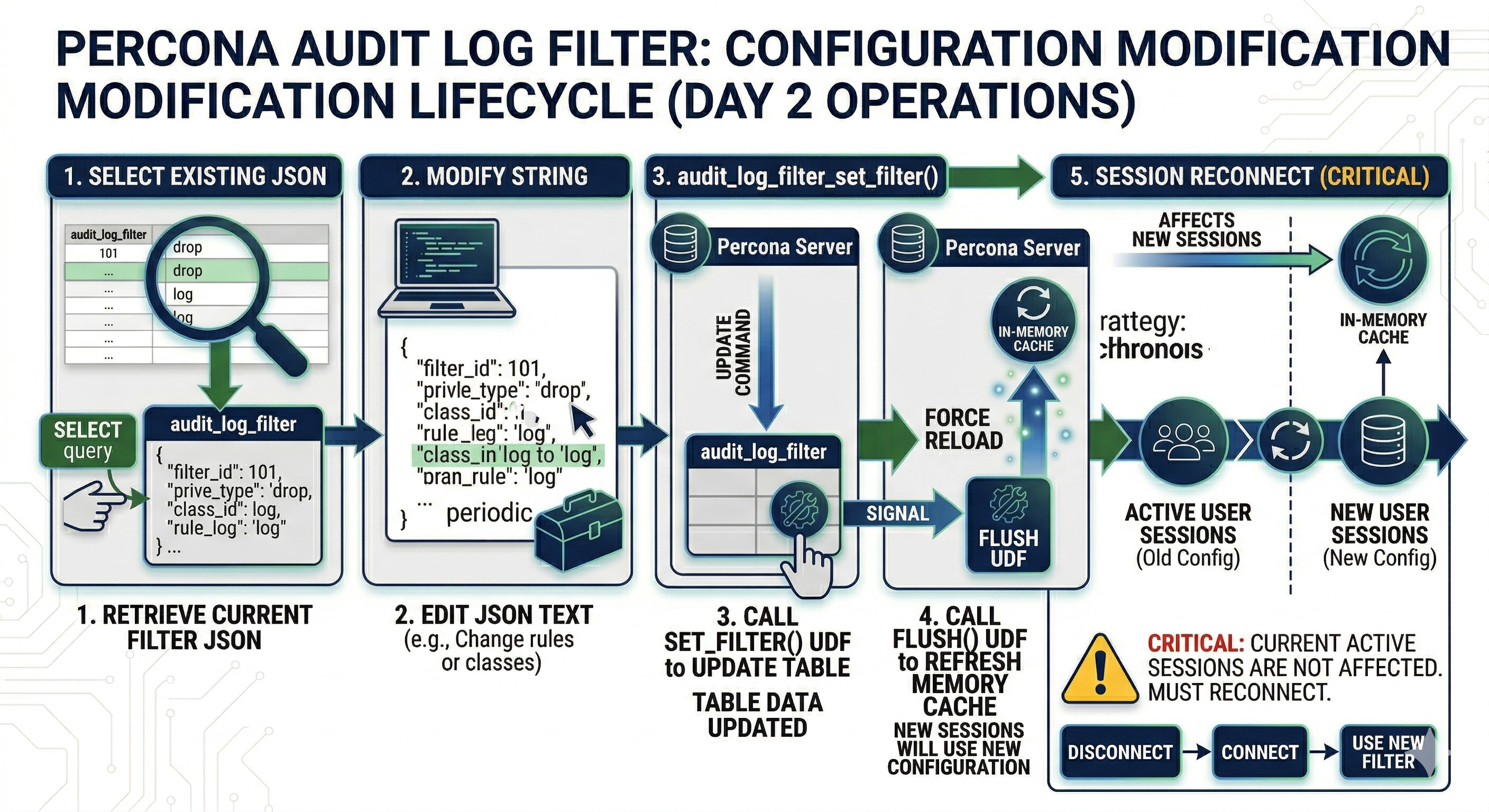
Filter modification lifecycle
The following diagram shows how filter changes persist, reload into the component, and reach sessions, including when audit_log_filter_flush() runs.
Constraints
Enable the component_audit_log_filter component and ensure audit tables exist before calling audit log filter functions. The account must hold the required privileges.
Filter definition validation
The server validates filter definitions at parse time and rejects invalid input with a clear error:
-
Unknown field names (for example,
"WRONG.str") -
Invalid class or event subclass names
-
Empty arrays (for example,
"class": []) -
Unknown JSON keys
-
printrules that reference invalid fields for any class in a multi-class array -
Mismatched field types (for example, negative values for unsigned fields, or integers where only strings are allowed)
An empty filter object {} is equivalent to {"filter": {"log": true}} and logs every event. To log nothing, use {"filter": {"log": false}}.
Parse-phase subclass names must use preparse and postparse.
audit_log_filter.event_mode controls which classes new definitions may use. Filters saved under FULL can still load under REDUCED with some classes skipped. See the variable reference for details.
Using the audit log filter functions
Assignment vs rules inside the JSON
Two mechanisms apply, in order:
-
Assignment (
mysql.audit_log_user). Each session uses one named filter from theUSERandHOSTcolumns. The columns take the sameuser_name@host_nameform you pass toaudit_log_filter_set_user(). The server loads the filter’s JSON frommysql.audit_log_filter. Assignments do not merge. A session never evaluates two separate filter definitions at once. -
Rules inside the assigned JSON.
logconditions on a class or event block narrow which events match within the already-selected filter. Conditions compare event fields such asuser.str,host.str,table_database.str,table_name.str, andstatuswithfielditems. Combine conditions withand,or, andnot. These conditions are not a second user-level or host-level assignment row. For example, bind one filter to'app'@'%'and include alogcondition under aconnectionrule so that only connection events from chosen client hosts are logged.
See Test event field values and Combine conditions with logical operators for the grammar used in rule-level conditions.
Which audit_log_user row applies
On connect, the component selects a row in mysql.audit_log_user whose USER and HOST match the session account. Literal user@host pairs match when they equal the session identity. Wildcard characters % and _ are allowed in the host portion of the assignment string. See audit_log_filter_set_user(). Pattern matching follows the behavior set by that function.
Keep assignments non-overlapping when you use wildcards. When several rows could match one connection, precedence is not specified on this page. Prefer explicit literal user@host rows, or one clear pattern plus a '%' default. Confirm behavior on a test server.
When no row matches, the component uses the default assignment: the account registered with audit_log_filter_set_user() using % as the user name.
When neither a matching row nor a default exists, the component skips event processing for that connection.
A specific account row overrides the default. When both admin@localhost and % have filters, admin from localhost uses the admin@localhost filter, not the default.
You can bind filters to named accounts or remove those bindings.
To clear a binding, unassign the filter or assign a different one. Session refresh on assignment change is described under audit_log_filter_set_user() and audit_log_filter_remove_filter().
set_filter options and available filters
The JSON layout — filter, class, nested rules, and examples — appears in Write audit_log_filter definitions. The authoritative list of class names, event subclass names, and per-class field names that audit_log_filter_set_filter() accepts appears in Audit Log Filter definition fields. This section lists the keys that may appear at each level of a filter definition.
Filter-level keys
| Key | Role |
|---|---|
log |
Boolean global default. true enables logging everywhere not turned off by a more specific rule. false requires per-class or per-event log overrides to write anything. |
class |
One class block or an array of class blocks. Each block sets "name" to an event class: general, connection, table_access, or message. event_mode=FULL also accepts global_variable, command, query, stored_program, authentication, and parse. |
id |
Optional filter identifier. Referenced by activate and ref when one filter swaps itself for another mid-session. See Replace a filter dynamically. |
Class-block keys
| Key | Role |
|---|---|
name |
The class name from the preceding list. |
log |
Optional. Boolean, or a condition that narrows matches by event-field values. |
event |
Optional. One event block or an array. Each block names one subclass and can carry log, abort, print, or a nested filter. Subclasses depend on the class. For table_access: read, insert, update, and delete. For connection: connect, disconnect, and change_user, plus pre_authenticate in FULL mode. See the event and subclass table and definition fields. |
print |
Optional. Field-replacement rule. Limited to replacing general_query.str or query.str with query_digest. See Redact audit log fields. |
Event-block keys
| Key | Role |
|---|---|
name |
Subclass name. A string for one subclass, or an array for several. |
log |
Optional. Boolean, or a condition over event fields. |
abort |
Optional. Boolean or condition that blocks execution of matching statements. See Block statements with an audit log filter. |
print |
Optional. Field-replacement rule scoped to the event. See Redact audit log fields. |
filter |
Optional. Nested subfilter used with activate and ref for dynamic filter swapping. See Replace a filter dynamically. |
Conditions
log and abort accept a Boolean (true or false) or a condition built from the following items:
| Item | Role |
|---|---|
field |
{ "name": "<event-field>", "value": <value> }. Compares an event field such as user.str, host.str, table_database.str, table_name.str, status, general_command.str, or general_sql_command.str. Per-class fields appear in Audit Log Filter definition fields. |
variable |
{ "name": "<server-variable>", "value": <value> }. Compares a predefined variable such as audit_log_connection_policy_value. |
function |
{ "name": "<function>", "args": [...] }. Calls a built-in such as find_in_include_list, string_find, or query_digest. |
and |
Array of sub-conditions. All must be true. |
or |
Array of sub-conditions. At least one must be true. |
not |
A single sub-condition. True when the inner condition evaluates to false. |
Field-value typing appears under audit_log_filter_set_filter() and in the connection section of Audit Log Filter definition fields. Examples include JSON numbers for integer fields such as status, strings for *.str fields, and "::tcp/ip"-style symbolic constants for connection_type.
Examples
Start from a single-class filter that logs every connection event the component sees:
SELECT audit_log_filter_set_filter('log_connection', '{
  "filter": {
    "class": { "name": "connection" }
  }
}');
Narrow to a single subclass by nesting event inside the class block (not as a sibling of class):
SELECT audit_log_filter_set_filter('log_connect_only', '{
  "filter": {
    "class": {
      "name": "connection",
      "event": { "name": "connect" }
    }
  }
}');
Narrow further by adding a log condition that tests event fields. The following example logs connect events from only two accounts, originating from one host:
SELECT audit_log_filter_set_filter('log_admin_connect', '{
  "filter": {
    "class": {
      "name": "connection",
      "event": {
        "name": "connect",
        "log": {
          "and": [
            { "field": { "name": "user.str", "value": ["admin", "developer"] } },
            { "field": { "name": "host.str", "value": "10.0.0.5" } }
          ]
        }
      }
    }
  }
}');
For full authoring detail, see:
-
Write audit_log_filter definitions — inclusive and exclusive patterns, conditions, and the complete grammar.
-
Audit Log Filter definition fields — canonical class, event, and field names that validation accepts.
-
audit_log_filter.event_mode—REDUCEDagainstFULLclass sets.